ELITE10
Get 10% off on your first order
Linux VPS Hosting India 2026 — Complete Guide (Ubuntu, Debian, CentOS & More)
Pick a Linux distribution, understand the infrastructure behind your VPS, and match a plan to your workload.

Table of Contents
Quick answer
A Linux VPS gives you a virtual server with root access, so you can install a distribution, configure services, and manage your own security and updates. Elite Hosting lists eight India VPS tiers in the current VPS guide, starting with IN-STARTER at ₹800/month for 2 vCPU, 4 GB RAM, and 40 GB NVMe. Check the plan page for current pricing, operating-system images, and traffic terms before ordering.
For a new Linux deployment, choose a currently supported Ubuntu LTS, Debian stable, Rocky Linux, or AlmaLinux image. CentOS 7 and CentOS 8 have reached end of life, so use them only when a legacy application requires them and you understand the security trade-off.
What a Linux VPS gives you
A VPS is a virtual machine running on a physical host. Linux distributions provide the operating system and package-management tools; the VPS provider supplies the virtual CPU, memory, storage, network connection, and console or reinstall controls.
- Root access: install system packages, create users, configure services, and manage firewall rules.
- Isolation: run your own web server, database, API, bot, VPN, or development environment.
- Choice: select a distribution that fits your application and administration experience.
- Responsibility: apply security updates, configure access, monitor resource use, and keep backups.
Linux VPS hosting is commonly unmanaged: root access gives flexibility, but the customer is responsible for software configuration unless managed support is explicitly included.
Choose a Linux distribution
| Distribution | Good fit for | Package tools | Notes |
|---|---|---|---|
| Ubuntu Server | General hosting, tutorials, cloud applications | apt | Choose a supported LTS release for long-running servers |
| Debian | Stable, minimal server installations | apt | Use a currently supported stable release |
| Rocky Linux | Enterprise-style environments and RHEL-compatible software | dnf | Confirm application compatibility before migration |
| AlmaLinux | RHEL-compatible hosting and server workloads | dnf | Check the provider image list for available versions |
| CentOS | Legacy software that depends on a specific CentOS release | yum / dnf | CentOS Linux 7 and 8 are end of life; avoid for new public servers |
The supplied VPS information lists Ubuntu 20.04/22.04, Debian 10/11, CentOS 7/8, Rocky Linux, and AlmaLinux as available choices. Image availability can change, and some listed releases are outdated. Confirm the current control-panel image list and support lifecycle when deploying.
Choose a distribution based on your software documentation, security-update lifecycle, and familiarity. You can often reinstall from the provider panel, but reinstalling normally erases the existing system disk, so back up data first.
CPU, storage, network and security
CPU: plan vCPU counts are virtual allocations, not necessarily dedicated physical cores. The existing VPS guide lists AMD EPYC 7C13 hardware. Ask about CPU sharing and sustained-use limits if your application compiles code, serves high request volume, or runs databases.
Storage: the VPS plans list NVMe storage. Fast disks help with package installs, container layers, logs, and database writes, but actual performance depends on per-instance limits and host contention. Keep enough free capacity for logs, updates, and backups.
Network: test latency from your target users and confirm the plan's traffic allowance. The VPS plan cards describe traffic as limited; do not assume unlimited transfer unless the provider confirms the allowance and fair-use terms for your selected plan.
DDoS protection: Linux firewalls such as nftables or iptables can filter traffic that reaches the VM, but cannot restore an upstream link saturated before packets arrive. Ask the provider about upstream mitigation, covered protocols, null-route policy, and incident handling. The VPS page lists DDoS protection as an included feature; verify the exact policy for VPS services.
Basic hardening: update packages, use SSH keys where possible, disable password login only after confirming key access, create a non-root admin account, enable a firewall, and keep an off-server backup. Never expose database or control ports publicly unless needed.
India VPS plans and prices
The plan names and prices below are copied from the current Elite Hosting VPS article. Prices and allocations may change; verify the live product page and checkout. The plan cards currently describe bandwidth as limited traffic, so ask for the exact allowance.
| Plan | vCPU | RAM | NVMe | Listed price/month |
|---|---|---|---|---|
| IN-STARTER | 2 | 4 GB | 40 GB | ₹800 |
| IN-BASIC | 4 | 8 GB | 80 GB | ₹1,600 |
| IN-STANDARD | 6 | 16 GB | 160 GB | ₹3,200 |
| IN-PREMIUM | 12 | 32 GB | 320 GB | ₹6,400 |
| IN-ULTIMATE | 24 | 64 GB | 640 GB | ₹12,800 |
| IN-ENTERPRISE | 48 | 128 GB | 1.28 TB | ₹25,600 |
| IN-CLASSIC | 64 | 256 GB | 2.56 TB | ₹50,720 |
| IN-ULTRA | 128 | 512 GB | 5.12 TB | ₹98,440 |
Recommended plans by Linux workload
| Workload | Starting point | What to size for |
|---|---|---|
| Nginx/Apache website or small API | IN-STARTER | Application memory, database use, and traffic peaks |
| Database server | IN-BASIC to IN-STANDARD | Working-set size, disk I/O, backups, and concurrent queries |
| Docker host or CI runner | IN-STANDARD to IN-PREMIUM | Container memory limits and simultaneous builds |
| VPN or lightweight bot | IN-STARTER | Concurrent connections and monthly transfer allowance |
| Multiple services or larger application | IN-ULTIMATE and above | Redundancy, monitoring, recovery, and operational support |
These are starting points, not guarantees. Measure CPU, memory, disk I/O, and network use after launch. Leave room for the operating system, monitoring agents, logs, and backups, and scale when real metrics show a bottleneck.
Getting started over SSH
- Choose a supported distribution image and deploy the VPS.
- Connect using the IP address and credentials supplied in the control panel.
- Update the system before installing public-facing services.
- Create a non-root administrator, configure SSH keys, and enable a firewall.
- Install only the services you need and schedule tested off-server backups.
# Ubuntu or Debian
sudo apt update && sudo apt upgrade -y

# Rocky Linux or AlmaLinux
sudo dnf update -y

# Connect to your VPS
ssh username@your-server-ip
Do not paste commands into a production server without understanding them. Keep your SSH session open while testing configuration changes, and verify that you can reconnect before closing it.
Frequently asked questions
Which Linux distribution should I choose for a VPS? Ubuntu LTS and Debian stable are common general-purpose choices. Rocky Linux or AlmaLinux may suit software built for RHEL-compatible systems. Check application support and release lifecycle first.
Can I install Ubuntu or Debian? The supplied VPS guide lists Ubuntu and Debian images. Confirm the exact versions currently available in the deployment panel.
Should I use CentOS 7 or CentOS 8? They are end-of-life CentOS Linux releases. Prefer a supported OS for new internet-facing servers; use an old release only for a necessary legacy dependency and plan a migration.
Does a Linux VPS include root access? Elite Hosting lists full root access for VPS. Confirm the login method and console access in your control panel, then secure SSH before exposing services.
Is Linux VPS managed? Root access usually means you manage the operating system and applications yourself. Confirm whether operating-system administration, monitoring, backups, and incident response are part of your purchased support level.
How much bandwidth is included? The plan cards in the VPS information describe traffic as limited. Ask for the exact allowance and any fair-use or overage rules before choosing a plan.
Can I reinstall or change my distribution later? Availability depends on the provider's control panel. Reinstallation can erase the VPS disk, so export and verify backups before changing images.
Conclusion
A good Linux VPS starts with a supported distribution, enough memory for the workload, predictable storage and network terms, and a security routine you can maintain. Ubuntu, Debian, Rocky Linux, and AlmaLinux cover most new deployments; avoid end-of-life operating systems for public services.
Use the current plan table as a price reference, then verify the live checkout, available OS images, traffic allowance, and support scope. After deployment, patch regularly, restrict access, monitor usage, and keep tested backups.
About the Author
Excellent
4.8/5.0
105 Reviews
Discover the features that set Elite Hosting apart from the rest.
Our infrastructure, housed in top-tier data centers with the most reliable uplinks, allows us to offer our clients an impressive 99.9% uptime for their services.
We are dedicated to supporting you at all times. Our 24/7 Support Team is available to address any commercial or technical issues you may encounter.
your services are protected by enterprise-level security against DDoS attacks, with a capacity of up to 17Tbps, ensuring your services remain online seamlessly.
Immerse yourself in lightning-fast load times and seamless performance with NVMe storage technology, providing unparalleled speed and responsiveness.
Our hosting network is powered by high-performance AMD Ryzen 9 dedicated servers, delivering unparalleled game server performance.
We use Pterodactyl as our premium control panel for game servers. This user-friendly and efficient platform is ideal for managing any project.
With data centers around the world, we're always close to you.

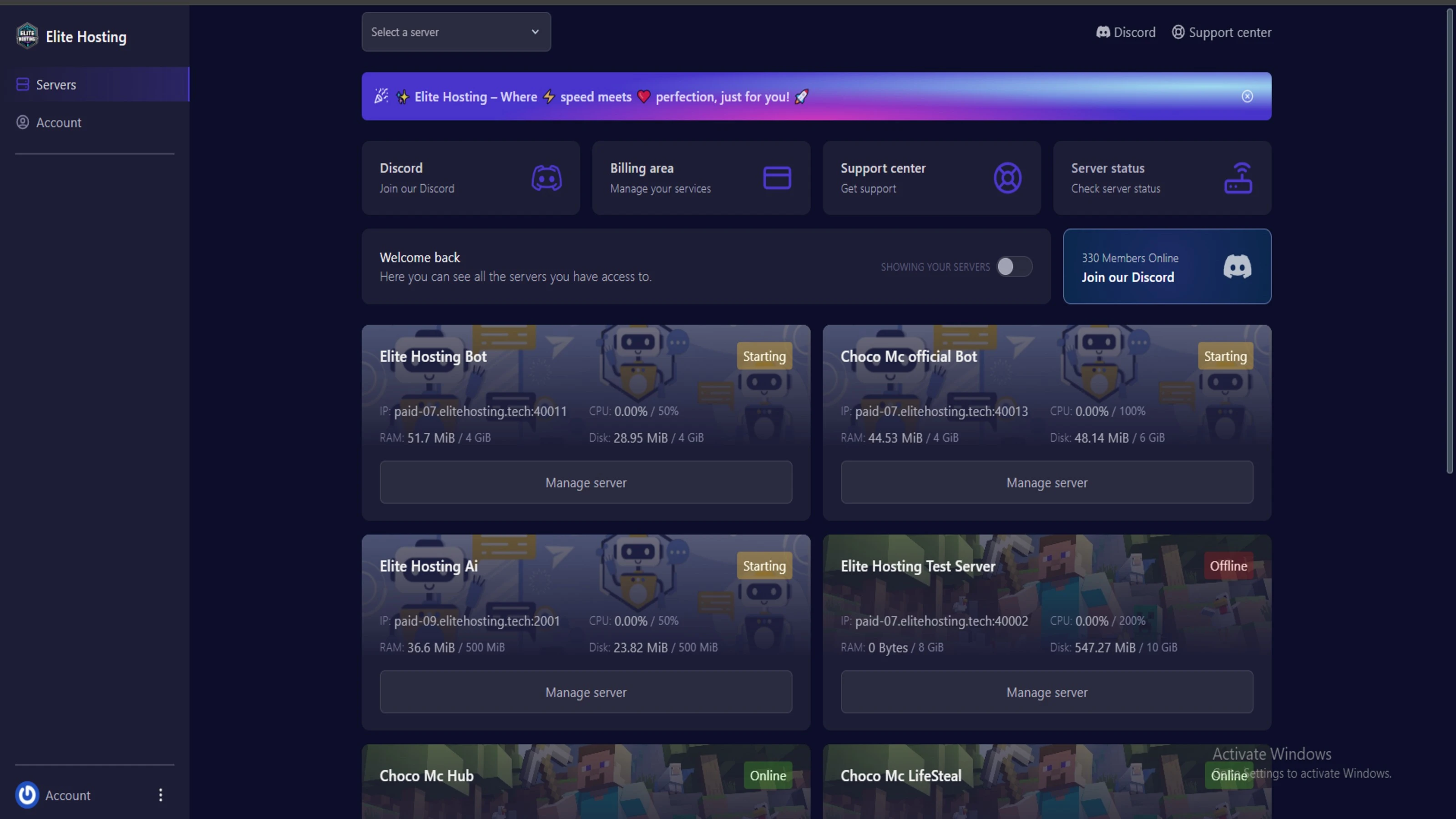
Experience Elite Hosting Control Panel
Pterodactyl is the premium panel used by us to control gaming services, offering our clients a user-friendly and efficient platform.
Frequently Asked Questions
Got questions? Check out these FAQs from our latest customers. If you need further assistance, explore our knowledge base or reach out to our support team.
We offer lightning-fast servers, 99.5% uptime, and low-latency connections with Global Location — ensuring smooth performance for your games and projects. Our platform is optimized for gamers, developers, and creators who demand speed, reliability, and scalability.
All our servers are deployed instantly after payment. You can start using your server within seconds. Our automated setup ensures no waiting time — just purchase, deploy, and play.
Absolutely! You can upgrade your plan anytime without losing your data. Your files, configurations, and backups remain fully intact during the upgrade process.
Yes! We take security seriously with Anti DDoS protection, regular backups, and encrypted connections. Your data and servers are always protected, giving you complete peace of mind while you focus on your projects.
15 min read • Rohit Kushwah
12 min read • Rohit Kushwah

15 min read • Rohit Kushwah
Choose which cookies you want to allow. You can change these settings at any time.