ELITE10
Get 10% off on your first order
Best VPS Hosting in India (2026): What Developers, Game Servers & Businesses Actually Need
A practical guide to choosing VPS hosting in India for applications, automation, game servers, APIs, and business workloads that need stable performance.

Table of Contents

Quick answer
The best VPS hosting in India is not simply the plan with the most RAM or the lowest monthly price. For developers, game servers, and businesses, the important signals are consistent CPU access, stable routing, fast storage, network-level DDoS protection, and the freedom to configure the operating system.
Elite Hosting gives Indian workloads a practical foundation for Linux and Windows VPS deployments. You can run web applications, APIs, automation workers, databases, bots, game servers, and Windows RDP workloads without being limited to the narrow use case of shared hosting.
Why VPS hosting in India is different
India's hosting market has improved quickly, but VPS quality still varies significantly between providers. Two plans with identical RAM and vCPU numbers can behave very differently when one runs on an oversold node or an unstable network.
Common problems include shared CPU contention, indirect routing between Indian ISPs, reactive DDoS protection, and VPS platforms designed for short website requests rather than long-running services. These issues may remain invisible during light usage and appear suddenly when traffic or processing demand grows.
That is why performance should be judged under sustained workload, not only by the specification table or an idle ping test.
Why CPU performance matters more than RAM
RAM is important for application data, caches, databases, and virtual machines, but CPU performance often becomes the first bottleneck. This is especially true for background jobs, game servers, real-time APIs, bots, build systems, and automation tools.
Some budget VPS providers place too many instances on the same physical processor. When several customers use their allocations at the same time, your VPS may experience slowdowns even though your dashboard still shows free RAM.
- Random slowdowns during busy hours
- Delayed background jobs and queue processing
- Inconsistent API response times
- Game server tick drops and simulation lag
- Unpredictable performance under sustained load
A smaller VPS with stable CPU access can outperform a larger plan on crowded hardware. Ask providers about CPU families, allocation policy, and sustained performance instead of comparing core counts alone.
Network quality is about stability, not just speed
Low latency is useful, but a single ping number does not describe the quality of a VPS network. Routing can change depending on ISP congestion, peering, upstream capacity, and time of day.
For APIs, game servers, VoIP, dashboards, and remote administration, jitter and packet loss are often more damaging than a slightly higher but stable average ping. A good Indian VPS platform should provide predictable routes and enough upstream capacity for traffic spikes.
Test from the networks your users actually use, including Jio, Airtel, BSNL, and other major carriers. Test during evening peak hours as well as quiet periods. Stable behavior is a stronger signal than a perfect screenshot taken at noon.
Why DDoS protection is essential
Public VPS services are exposed to scanning, automated attacks, traffic floods, and targeted disruption. A firewall running inside the VPS is useful for filtering application traffic, but it cannot stop an attack that has already saturated the server's bandwidth or consumed its CPU.
Effective protection should begin at the network edge. Filtering malicious traffic before it reaches the VPS keeps applications, databases, game servers, and remote access services available during real-world attacks.
When comparing providers, ask where mitigation happens, how legitimate traffic is preserved, and whether protection is automatic. DDoS protection should be part of the infrastructure design rather than an afterthought added to a plan page.
VPS vs shared hosting: the control factor
Shared hosting is convenient for a limited set of website workloads, but modern applications often need more control. A VPS gives you administrator or root access so you can configure the operating system, install packages, manage ports, run background processes, and choose how services communicate.
- Deploy Docker, Node.js, Python, Go, PHP, or custom services.
- Run databases, queues, cron jobs, workers, and monitoring tools.
- Host game servers, Discord bots, automation, or staging environments.
- Choose Linux for efficiency or Windows Server for RDP and GUI workflows.
Control alone does not guarantee good performance. A weak VPS platform can still be slow, so hardware, network quality, storage, and support remain essential.
Linux VPS vs Windows VPS: what makes sense in India?
There is no universally better operating system. The correct choice depends on your software, team, management style, and workload.
| Workload | Better fit | Why |
|---|---|---|
| APIs, web apps, Docker, CI/CD | Linux VPS | Low overhead, SSH, automation, and broad developer tooling |
| Windows-only software | Windows VPS | Native compatibility and administrator access |
| Game or simulation server | Often Windows VPS | Direct control over tools, processes, and live monitoring |
| Automation and backend workers | Linux VPS | Efficient resource use and easy scripting |
Windows is not automatically slow, and Linux is not automatically fast. CPU quality, storage, background load, and network stability have a larger effect than the operating system label.
Choosing a VPS by use case
Developers: look for Linux support, snapshots, SSH access, fast NVMe storage, predictable CPU performance, and an upgrade path. Docker, databases, CI/CD runners, and staging environments all benefit from a VPS that can run continuously without surprise throttling.
Game server owners: prioritise single-core CPU speed, stable routing, low contention, edge DDoS mitigation, and the operating system your server tools support. A Windows VPS with RDP can be useful for FiveM and other workloads that need live administration.
Businesses: consider uptime, backups, access control, monitoring, support, and recovery procedures alongside raw specifications. A VPS should reduce operational risk, not create another system that only one person knows how to manage.
Automation users: check process limits, outbound networking, cron or task scheduling, storage I/O, and whether the provider permits the services you need. Stable CPU access matters when workers run continuously.
Common VPS mistakes Indian users make
Most VPS problems are not caused by choosing the wrong application. They come from choosing infrastructure based on incomplete signals.
- Choosing a plan based on RAM alone
- Ignoring CPU contention and sustained workload performance
- Assuming a basic firewall is the same as network-level DDoS protection
- Testing latency once and ignoring peak-hour routing
- Waiting until a service fails before creating backups or migrating
- Buying more resources without measuring the actual bottleneck
These mistakes become more expensive as traffic and service dependencies grow. Measure CPU, memory, disk I/O, network behavior, and application response time from the beginning.
How to scale VPS hosting correctly
Healthy VPS growth is gradual. Start with a controlled workload, set up monitoring and backups, and establish a baseline for CPU, memory, storage, and network behavior. Upgrade before the server is permanently saturated rather than waiting for users to report failures.
Elite Hosting gives Indian users a practical path from smaller VPS workloads to larger deployments. The important part is not buying the largest plan immediately; it is choosing an infrastructure platform that lets you add resources without rebuilding your services or accepting a sudden loss of performance.
For production workloads, separate application, database, staging, and backup responsibilities when the system grows. This makes troubleshooting easier and prevents one busy process from taking down every service.
Frequently asked questions
What is the best VPS hosting in India in 2026? The best option depends on your workload, but consistent CPU performance, stable routing, edge DDoS protection, NVMe storage, and flexible Linux or Windows support are the most important foundations.
Is Linux VPS better than Windows VPS? Linux is usually more efficient for web applications, APIs, Docker, and automation. Windows VPS is often the better fit for Windows-only software, GUI-based workflows, RDP administration, and some game server setups.
How much RAM do I need for a VPS? It depends on your operating system, applications, database, traffic, and background services. Measure memory usage, but investigate CPU and disk I/O before assuming more RAM will solve slow performance.
Is VPS hosting suitable for game servers? Yes, if the VPS has strong single-core CPU performance, low contention, stable routing, suitable operating system support, and network-level DDoS mitigation.
Does Elite Hosting provide Windows VPS with RDP? Elite Hosting supports VPS workloads that need administrator control, including Windows Server RDP use cases. Confirm the current plan, operating system, licensing, and resource availability before ordering.
Conclusion
The best VPS hosting decisions are based on consistency rather than impressive numbers. Developers need reliable environments for applications and automation. Game server owners need CPU stability, routing, and protection. Businesses need uptime, access control, backups, and a provider that can support growth.
Elite Hosting gives Indian users a flexible foundation for Linux and Windows VPS workloads. Choose the configuration that fits your real use case, test it under sustained load, and scale before performance becomes an emergency.
About the Author
Excellent
4.8/5.0
107 Reviews
Discover the features that set Elite Hosting apart from the rest.
Our infrastructure, housed in top-tier data centers with the most reliable uplinks, allows us to offer our clients an impressive 99.9% uptime for their services.
We are dedicated to supporting you at all times. Our 24/7 Support Team is available to address any commercial or technical issues you may encounter.
your services are protected by enterprise-level security against DDoS attacks, with a capacity of up to 17Tbps, ensuring your services remain online seamlessly.
Immerse yourself in lightning-fast load times and seamless performance with NVMe storage technology, providing unparalleled speed and responsiveness.
Our hosting network is powered by high-performance AMD Ryzen 9 dedicated servers, delivering unparalleled game server performance.
We use Pterodactyl as our premium control panel for game servers. This user-friendly and efficient platform is ideal for managing any project.
With data centers around the world, we're always close to you.

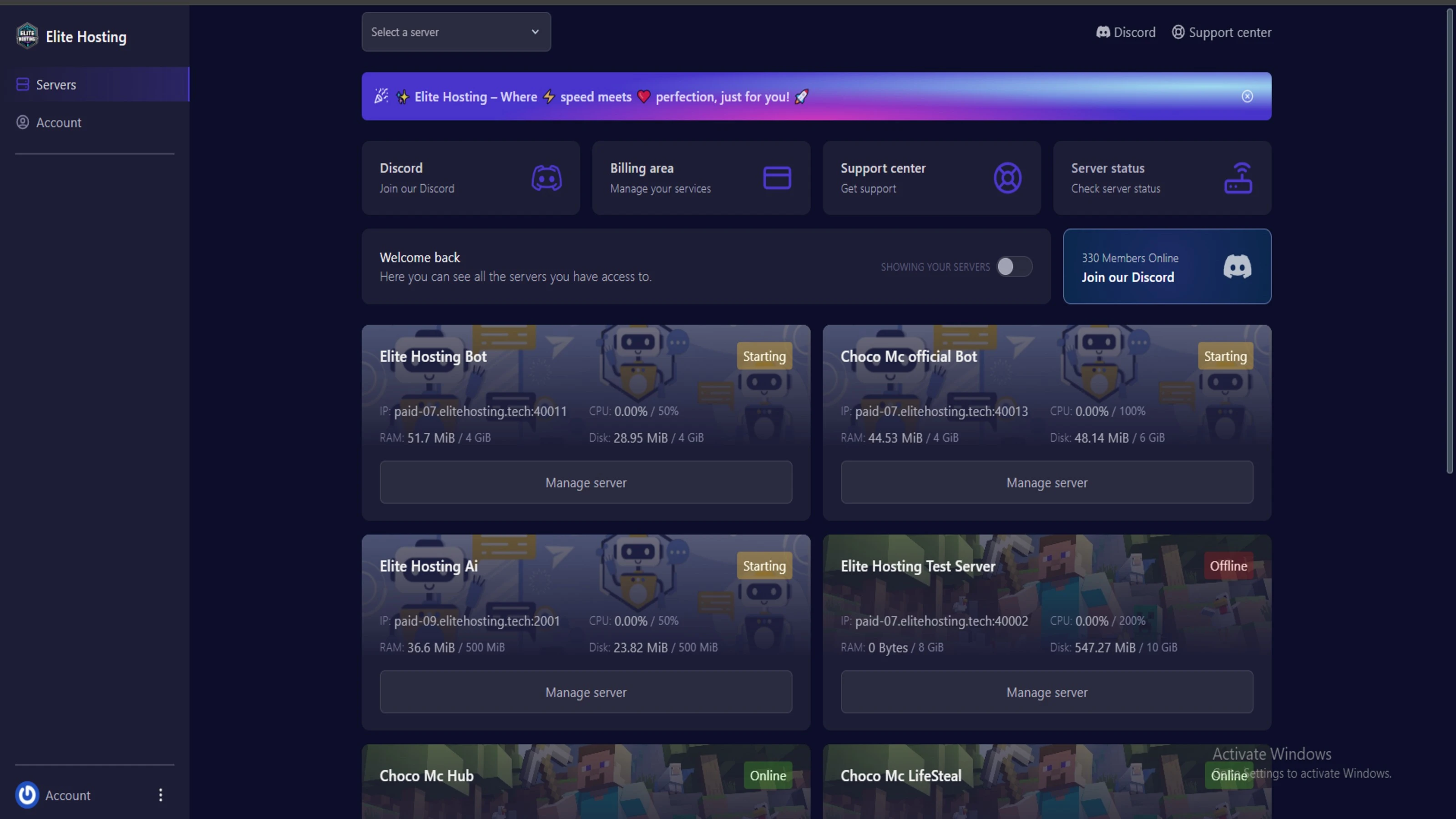
Experience Elite Hosting Control Panel
Pterodactyl is the premium panel used by us to control gaming services, offering our clients a user-friendly and efficient platform.
Frequently Asked Questions
Got questions? Check out these FAQs from our latest customers. If you need further assistance, explore our knowledge base or reach out to our support team.
We offer lightning-fast servers, 99.5% uptime, and low-latency connections with Global Location — ensuring smooth performance for your games and projects. Our platform is optimized for gamers, developers, and creators who demand speed, reliability, and scalability.
All our servers are deployed instantly after payment. You can start using your server within seconds. Our automated setup ensures no waiting time — just purchase, deploy, and play.
Absolutely! You can upgrade your plan anytime without losing your data. Your files, configurations, and backups remain fully intact during the upgrade process.
Yes! We take security seriously with Anti DDoS protection, regular backups, and encrypted connections. Your data and servers are always protected, giving you complete peace of mind while you focus on your projects.

14 min read • Rohit Kushwah

15 min read • Rohit Kushwah

16 min read • Rohit Kushwah
Choose which cookies you want to allow. You can change these settings at any time.